Delta-island.com
  • Home
  • Delta Store
  • Contents
    • Net Yaroze
    • Safety Guide
  • Tutorials
    • Playstation : Delta PSNee QSB
    • PlayStation : Delta Smartwave
    • PlayStation : IGR - In Game Reset QSB
    • STU Net Yaroze
    • Megadrive : Mega SmartDrive
    • PS1 To NeoGeo Controller
    • Repair Everdrive MD V2
    • Repair Everdrive MD V3
    • GDEMU Power Supply Mod
    • Repair GamePark32 GP32 BLU FLU
    • Sega Dreamcast - DreamTray
  • Download
  • Forum

Select your language

  • Français (France)
  • English (United Kingdom)

⚠️ Safety Recommendations

Installing modchips, custom PCBs, adapters, and hardware solutions involves soldering and electronic handling. These operations carry real risks if not performed correctly.

This page aims to highlight best practices, required protective equipment, and potential risks.
PPE

 
🔥 Important
Electronic soldering requires practice, precision, and experience.
If you have never performed fine PCB soldering or are not completely comfortable with this type of work, have your Delta products installed by a qualified professional.
⚠️ POWER OFF IS MANDATORY
Before any soldering or internal handling:
  • Completely unplug the console (mains power, PSU, cables).
  • Never work on a powered or standby device.
  • Wait until all capacitors are fully discharged to prevent any risk of electric shock or hardware damage.
  • If unsure, check for residual voltage using a multimeter.
✅ Golden rule: always work on a fully powered-off console.

⚡ Potential Risks

  • Severe burns from soldering iron (300–400°C)
  • Inhalation of flux and solder fumes
  • Hot solder splashes
  • Electrostatic discharge (ESD) damaging components
  • Short circuits destroying the console
  • Irreversible PCB trace damage
  • Fire hazard due to faulty equipment
 

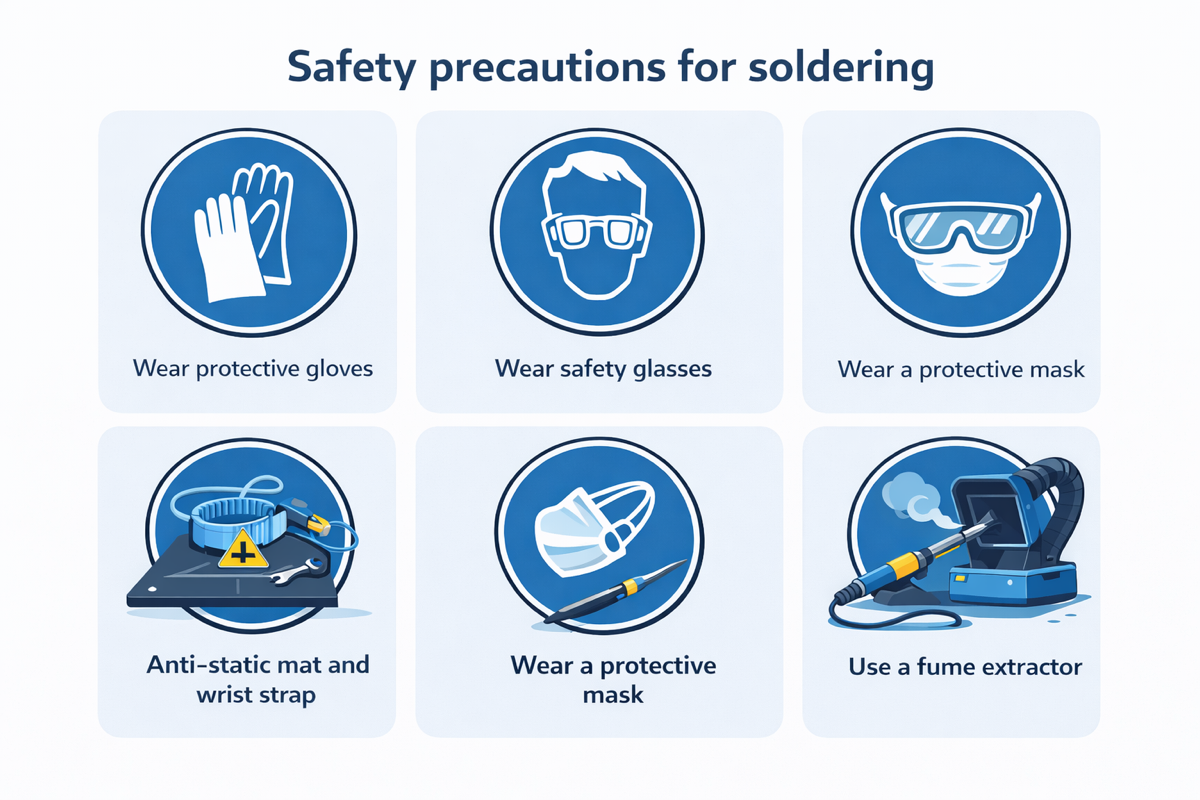
🛡️ Recommended Protective Equipment (PPE)

  • ✔️ Safety glasses
  • ✔️ Antistatic (ESD) mat
  • ✔️ Grounded ESD wrist strap
  • ✔️ Secure soldering iron stand
  • ✔️ Fume extractor or well-ventilated workspace
  • ✔️ Heat-resistant gloves (optional but recommended)

Never work in a closed, non-ventilated environment.


🔧 Soldering Best Practices

  • Use a quality temperature-controlled soldering iron
  • Work between 320°C and 350°C depending on solder type
  • Use electronic-grade solder with integrated flux
  • Never apply force to PCB traces or pads
  • Avoid excessive solder (solder bridges)
  • Inspect every joint with magnification or microscope
  • Check continuity with a multimeter before powering on
 

🧰 Equipment Condition

Before any work:

  • ✔️ Ensure your soldering iron is in perfect condition
  • ✔️ Check cable insulation
  • ✔️ Work on a stable surface
  • ✔️ Always unplug the console before intervention
  • ✔️ Never solder a powered device
 

🎓 Required Experience

Micro-soldering on retro consoles requires:

  • Prior experience on practice PCBs
  • Mastery of desoldering techniques
  • Understanding of electronic schematics
  • Ability to diagnose short circuits
If you do not have this experience:
Have the installation performed by a qualified professional. Delta Island declines all responsibility for improper installation.
 
✔️ Conclusion
Delta products are designed with high quality standards. Their installation must be carried out with the same level of precision.

Work cleanly, methodically, and safely. Your safety always comes first.
Xrider Contents 17 February 2026
Dossier • PlayStation • Dev kit • Homebrew

The Net Yaroze

Released in 1996, the Net Yaroze is Sony’s “public” development kit for PlayStation: a matte black console focused on homebrew, capable of testing programs from a PC via a dedicated security chain (Boot CD + Access Card).

🖤 Matte black console 🌍 Free zone + SCEW 🔌 Serial link to PC
✨ Modern alternative (Delta Island)
Today, Delta Island develops modern solutions that recreate the Net Yaroze experience (comms, unlocking, development), with an integration designed for modders and developers.
Key takeaways
💿
Net Yaroze Boot CD
DTL-S3030 (JAP) / DTL-S3035 (US/PAL)
🧩
Access Card
Mandatory dongle (DTL-H3020) to enable comms mode.
🔐
MechaCon
Region/disc validation key, with a dedicated “SCEW” region.
Quick access (Delta Store)
• Delta Access Card
• STU Serial to USB (Net Yaroze)
• Delta PSNee QSB (modchip)
Sony PlayStation Net Yaroze
 

📌 Overview

The Net Yaroze is a PlayStation development kit released starting in 1996, aimed at hobbyist developers. It was sold in Japan, then in Europe and the United States.

Very close to a “standard” PlayStation, it stands out thanks to its matte black shell and a “communication” mode that lets you test homebrews sent from a PC.

To achieve this, the kit relies on a hardware & software chain: Boot CD + Access Card + serial cable + PC SDK tools.

🛒 Recreate the Net Yaroze experience (with Delta Island)

Original Net Yaroze kits are becoming rare and expensive. Delta Island offers modern alternatives to recover the key features: unlocking, dongle, and PC communication.

🔐 MechaCon / regions
Delta PSNee QSB
A modchip to bypass protections/region checks and open the door to dev-style use cases.
→ View Delta PSNee QSB
🧩 Access Card dongle
Delta Access Card
An alternative to the DTL-H3020 to unlock “dev kit” usage and enable the dedicated features.
→ View Delta Access Card
🔌 PC communication
STU Serial to USB
Replaces the DTL-H3050 serial cable with a practical USB solution for modern PCs.
→ View STU Serial to USB
Tip: if your goal is “development / homebrew”, the trio PSNee QSB + Delta Access Card + STU Serial to USB covers the key points explained in this dossier.

📦 What’s in the kit

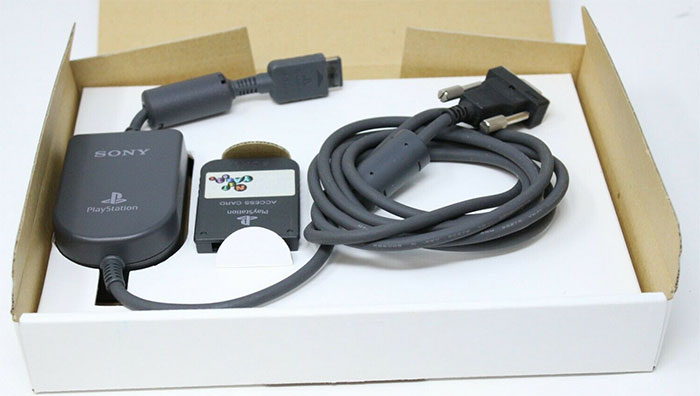
Net Yaroze serial cable + Access Card pack
DTL-H3050 (serial cable) + DTL-H3020 (Access Card)
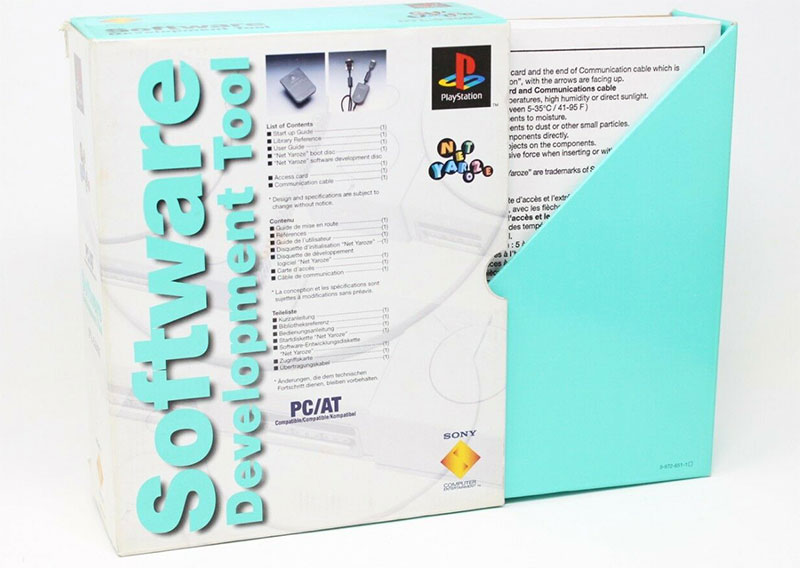
Net Yaroze development kit
Manuals + DTL-H3010 controllers + SDK media
Console references
- DTL-H3000: Japan (NTSC-J) • 110V PSU
- DTL-H3001: USA (NTSC-U) • 110V PSU
- DTL-H3002: Europe/Australia (PAL) • 230V PSU
The Net Yaroze kit includes
- Net Yaroze console (DTL-H3000/3001/3002)
- 2 matte black controllers (DTL-H3010)
- Black Access Card (DTL-H3020)
- Boot CD (DTL-S3030 JAP / DTL-S3035 US/PAL)
- PC SDK CD (DTL-S3040 JAP / DTL-S3045 US/PAL)
- Communication cable (DTL-H3050)
- Manuals (DTL-D3060, DTL-D3070, DTL-D3090 and variants)

🎬 Video

⚔️ Net Yaroze vs PlayStation

Visible differences
- Net Yaroze: matte black, slightly rough texture
- PlayStation: grey, smoother texture
Regions
- Net Yaroze: free zone (PAL/NTSC-J/NTSC-U) + SCEW
- Standard PS1: region locked (SCEI/SCEA/SCEE)

For the fairest comparison, we use a first-revision European PlayStation: SCPH-1002. Both machines can share a similar base (PU-8), but some components differ.

Net Yaroze PU-8 mainboard
Mainboard PU-8 (example)
The key component that differentiates the Net Yaroze is the MECHACON (Mechanism Control).
Contrary to a common belief: the BIOS is not specific to the Net Yaroze — it is identical to a standard PS1 BIOS.
🧠 Delta alternative: MechaCon bypass
If your goal is to recreate a “dev/homebrew” experience without an official kit, Delta Island offers the Delta PSNee QSB: a modchip designed for a clean, reliable install.
→ Available on the Delta Store

💿 Net Yaroze Boot CD & MechaCon

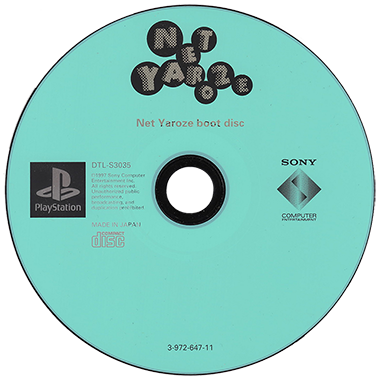
To communicate with a PC, the Net Yaroze must enter communication mode and execute code. The Boot CD is essential.

Net Yaroze Boot CD DTL-S3035
DTL-S3035
US / PAL version
Net Yaroze Boot CD DTL-S3030
DTL-S3030
JAP version
Why doesn’t the Boot CD work on a standard PS1?
Because the Net Yaroze Boot CD uses the SCEW region code. A standard PS1 is region-locked, and the code is validated via the MechaCon (SCEI / SCEA / SCEE). The Net Yaroze supports all those regions plus the kit-specific “World” region (SCEW).
Region codes (reminder):
- SCEI: JAP • SCEA: USA • SCEE: EUR
- Net Yaroze adds SCEW (World / Net Yaroze)
MechaCon : Mechanism Control Net Yaroze PlayStation
MechaCon (example) – region validation / disc security

🧩 The “Access Card” dongle

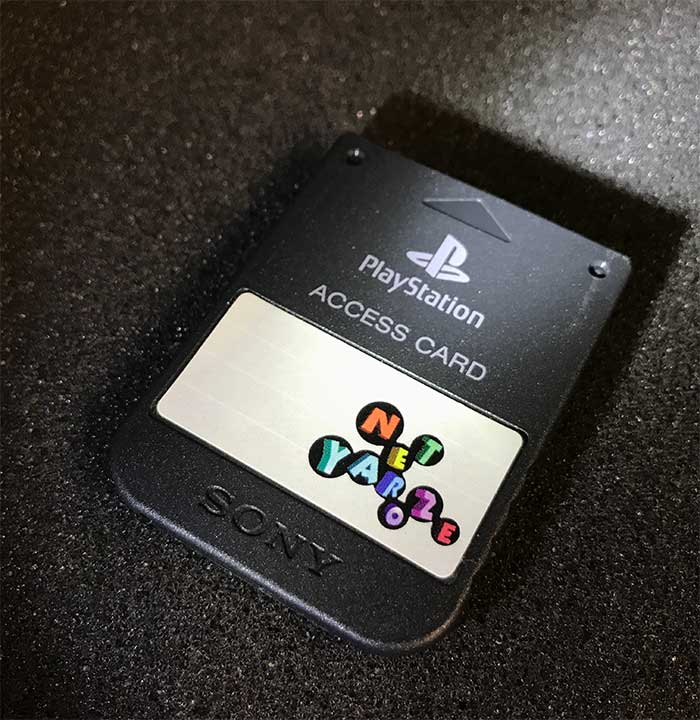
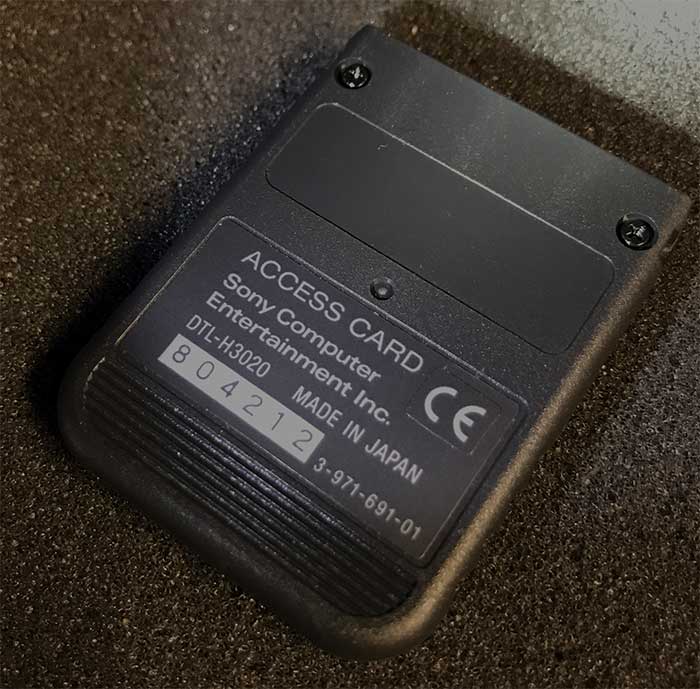
Sony added a security dongle to lock the use of the Boot CD: the Access Card. It plugs into Memory Card slot 1: on boot, the Boot CD checks for its presence to enable PC communication.

✅ Delta alternative: Delta Access Card
Delta Island offers the Delta Access Card: an alternative to the DTL-H3020 to unlock “dev kit” usage and restore the Net Yaroze logic.
→ View Delta Access Card on the Store
Net Yaroze Access Card (front)
Front – “Access Card”
Net Yaroze Access Card (back)
Back
Net Yaroze Access Card PCB
Internal PCB – Access Card security & identification

🔌 Serial communication cable (DTL-H3050)

The Net Yaroze uses a link similar to RS232: the main differences are the logic levels and voltage. To communicate correctly, you use the DTL-H3050 cable.

⚡ Delta alternative: STU Serial to USB
For modern PCs, Delta Island offers STU Serial to USB (Net Yaroze): a convenient USB solution to replace the DTL-H3050 serial cable.
→ View STU Serial to USB on the Store
Connection: Net Yaroze Serial port ↔ PC serial port.

🧰 Sony Net Yaroze SDK

The SDK is included in the kit (DTL-S3040 JAP / DTL-S3045 US & PAL). Everything runs under DOS.

It notably includes SIOCONS (“Serial Input Output Connections”), used to load your programs into memory and execute them on the Net Yaroze.

📚 DTL-H / DTL-S / DTL-D references

DTL-H3000 → Net Yaroze JAP
DTL-H3001 → Net Yaroze US
DTL-H3002 → Net Yaroze PAL
DTL-H3010 → Net Yaroze Controller
DTL-H3020 → Access Card
DTL-S3030 → Boot CD JAP
DTL-S3035 → Boot CD US/PAL
DTL-S3040 → SDK CD JAP (PC)
DTL-S3045 → SDK CD US/PAL (PC)
DTL-H3050 → Net Yaroze Serial Link
DTL-D3060 → Start Up Guide JAP
DTL-D3065 → Start Up Guide ENG
DTL-D3070 → User's Guide JAP
DTL-D3075 → User's Guide ENG
DTL-D3090 → Library Reference JAP
DTL-D3095 → Library Reference ENG

🚀 In practice: where to start?

If you want to get started with a Net Yaroze-style “dev/homebrew” experience, begin with what you’re missing: unlocking, dongle, or PC communication.

→ Delta PSNee QSB → Delta Access Card → STU Serial to USB
🧭 Contents
📌 Overview
🛒 Delta alternatives (modern kit)
📦 What’s in the kit
⚔️ Net Yaroze vs PS1
💿 Boot CD & MechaCon
🧩 Access Card
🔌 DTL-H3050 cable
🧰 SDK
📚 References
Tip: this dossier explains Net Yaroze security (SCEW + Access Card) — and how Delta alternatives let you recreate these features.
Xrider Contents 21 November 2019
© 2017 - 2026 delta-island.com - All rights reserved

Menu English

  • Home
  • Delta Store
  • Contents
    • Net Yaroze
    • Safety Guide
  • Tutorials
    • Playstation : Delta PSNee QSB
    • PlayStation : Delta Smartwave
    • PlayStation : IGR - In Game Reset QSB
    • STU Net Yaroze
    • Megadrive : Mega SmartDrive
    • PS1 To NeoGeo Controller
    • Repair Everdrive MD V2
    • Repair Everdrive MD V3
    • GDEMU Power Supply Mod
    • Repair GamePark32 GP32 BLU FLU
    • Sega Dreamcast - DreamTray
  • Download
  • Forum